iPhone Duo
Mac remote desktop for iPhone Duo.
Most remote desktop apps show a wide Mac screen shrunk onto a phone. Duotop asks your Mac for a display in the exact shape your Duo is in, so the Mac fits whether the phone is closed, half open or flat.
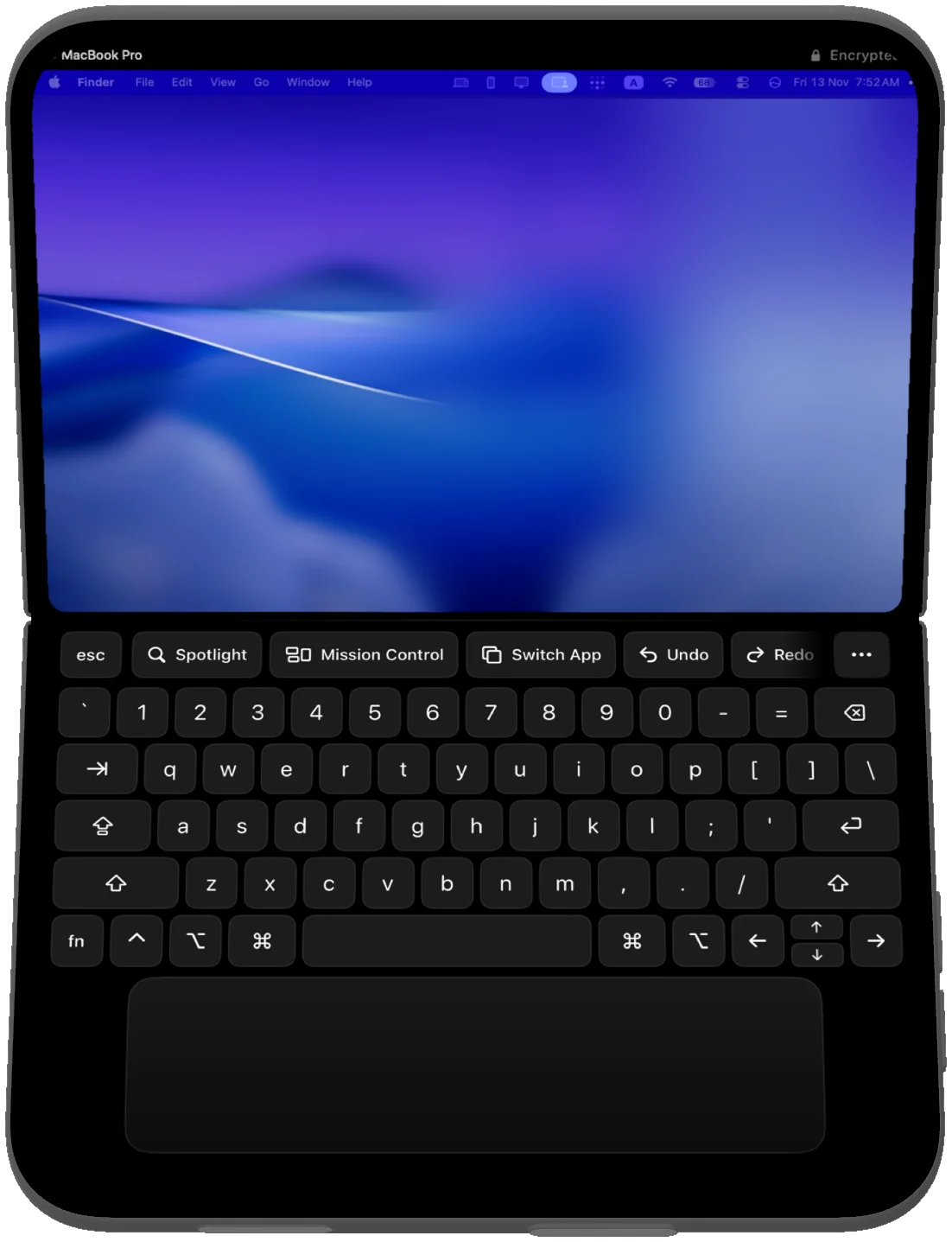
One Mac, three shapes
Half open: a tiny MacBook
Stand the Duo half open and the Mac moves above the fold. Below it sit a full Mac keyboard with Command, Option and Control, a row of app keys (Spotlight, Mission Control, Switch App, Undo, Redo) and a trackpad the width of the phone.
Closed: the outer display
Closed, the Mac fills the outer display. The controls sit in the strip beside the camera, outside the picture, so they never cover your work. Touch the picture directly, or use the screen as a trackpad.
Fully open: the whole inner display
Open the Duo flat and the Mac fills the inner display edge to edge, in either orientation. A small bar brings up the keyboard, app keys and pointer when you need them.
When you fold, open or turn the phone, the Mac's display is rebuilt at the new size. Windows are laid out for the screen you are holding, not scaled down from a bigger one.
What you can do on it
- Touch the Mac directly, or switch to trackpad mode for a pointer: click, right click, middle click, drag and scroll.
- Type with the on-screen Mac keyboard, the iOS keyboard in any language, or a hardware keyboard connected to the phone.
- Hear the Mac's sound on the phone.
- Copy text on one and paste it on the other.
- See your whole Mac (every window comes to the phone), or keep the Mac's own screen as it is and use the phone as a second display.
- Watch an agent work on your Mac, and pause it by touching the screen.
At home and away
On the same Wi-Fi, Duotop is free: one Mac, 60 frames per second, every layout, no time limit. Your phone and Mac connect to each other directly.
With Pro you can open your Mac from any connection with nothing to set up, at up to 120 frames per second, and pair as many Macs as you like. Away from your network the connection goes through Duotop's relay, which only passes encrypted data it cannot read. If you use Tailscale, Duotop connects directly instead. How to open your Mac away from home.
Private by design
You pair once with a six-digit code. After that every session is encrypted end to end with fresh keys, and only devices you paired can open your Mac. There is no account. Privacy policy.
What it does not do yet
- Copying images or files between the Mac and the device. The shared clipboard carries text.
- Using the device's microphone as the Mac's microphone.
- Waking a Mac that is asleep. The Mac has to be on and awake.
Get it
You need both apps. Duotop for Mac is a free download for macOS 26 or later. The iPhone and iPad app needs iOS 26 or iPadOS 26 and is on the App Store. Pairing takes one six-digit code, and there is no account.